
CricPlus Login: How to Sign In to Your Account on CricPlus.Support (Step-by-Step)
To log in to CricPlus, type cricplus.support into your browser, check the address bar, and click Login at the top right. Enter the CricPlus username and password you were given, then press Login. On your first login, the platform may ask you to set a new password or username before you continue.
CricPlus.Support is an official CricPlus domain that gives existing CricPlus account holders secure login, live odds and account support on the same CricPlus platform. You can check this, and see the full list of official domains, on the official domains page. For the bigger picture, read why CricPlus.Support is the safest way to access your account.
Key facts: CricPlus login (as of October 2026)
- You sign in with a username + password. The CricPlus login does not use your email or a one-time code (OTP).
- Login works only on official CricPlus domains: cricplus.support, cricplus.red, cricplus.help, cricplus.bz and cricplus.com.co.
- The platform may ask you to change your password or username right after your first login.
- CricPlus IDs and password resets come only from official WhatsApp support. No demo login is available.
- Using one ID on two or more devices at the same time can lock your account.
How do I log in to CricPlus?
You log in to CricPlus on CricPlus.Support in six steps: open the official site, check the address, click Login, enter your username and password, and complete any security change the platform asks for.
- Open the official site. Type cricplus.support into your browser's address bar yourself, or open a bookmark you saved earlier.
- Check the address bar. Make sure the address reads exactly cricplus.support, letter by letter, and starts with https. Look-alike addresses with extra letters, hyphens or different endings are not official.
- Click Login. Click the Login button at the top right of the page. A login window opens with two fields: Username and Password.
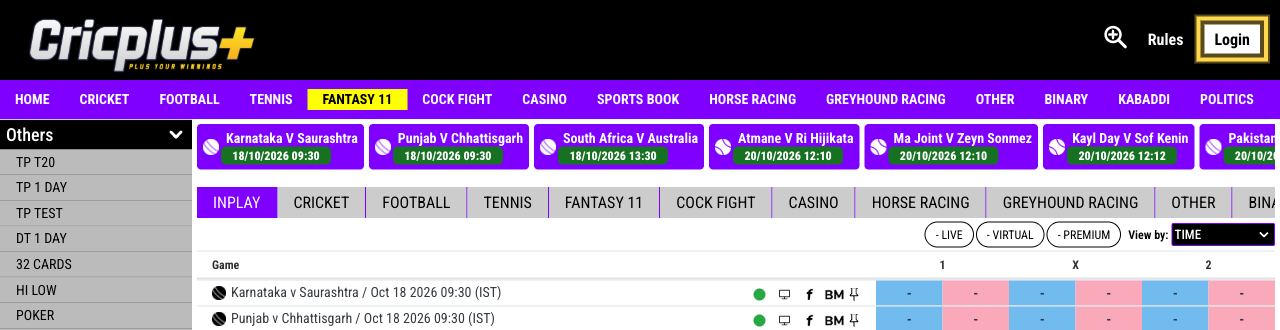
- Enter your username. Type your CricPlus username exactly as it was issued to you by official support. Do not enter your email address or phone number.
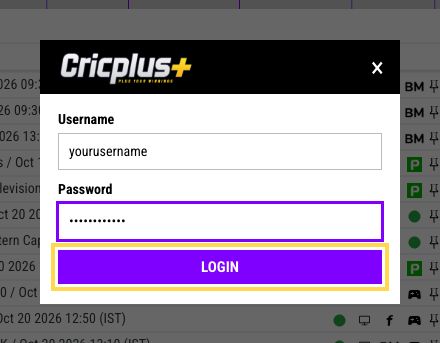
- Enter your password and press Login. Type your password, check that Caps Lock is off, and press the Login button. If you see "Invalid username or password", re-type both fields carefully.
- Complete any security change. If the platform asks you to set a new password or username, complete that step. You are signed in when your username appears in the top bar and the Login button changes to Logout.
Safety callout: Always type cricplus.support yourself or use a bookmark — don't log in through links in messages. The US Cybersecurity and Infrastructure Security Agency (CISA) gives the same advice: if a message might be genuine, don't use its links, and reach the company through a source you already trust, such as its official website (CISA: Recognize and report phishing).
Tip from the CricPlus Support team: if a login fails twice, stop and check your details before trying again. Several failed attempts in a row can lock your account, and only official WhatsApp support can unlock it.
What is my CricPlus login ID?
Your CricPlus login ID is the username issued with your account. It is not your email address or phone number.
CricPlus IDs are issued only through official WhatsApp support. There is no self-signup on CricPlus.Support and CricPlus does not use agents. Anyone selling or offering CricPlus IDs anywhere else is not official, so do not buy or accept an ID from them.
An existing CricPlus ID works on CricPlus.Support because it runs on the same platform. Keep to one ID: multiple IDs on the same device can lock your account.
Why am I asked to change my password or username after login?
The CricPlus platform may ask you to change your password or username right after login as a security step. It usually happens the first time you log in with a new ID, so that only you know your final details.
This screen is normal. If you skip it, it can look as if your login "isn't working", so complete it before you close the page.
When you choose a new password:
- Make it long. The UK National Cyber Security Centre suggests combining three random words to create a password that is "long enough and strong enough" (NCSC: Three random words).
- Don't use names, dates of birth, sports teams or a password you use on another site.
- Never share it with anyone, including people who say they are CricPlus support.
Can I log in to CricPlus on mobile?
Yes. You can log in to CricPlus on a phone or tablet by opening CricPlus.Support in your mobile browser. The same Login button and username and password fields appear in the top bar.
To log in on mobile:
- Open your mobile browser (for example Chrome or Safari).
- Type cricplus.support into the address bar and check it carefully.
- Tap Login at the top right, enter your username and password, then tap Login.
- Bookmark the page or add it to your home screen for next time.
Use the website in your mobile browser. Never install CricPlus APK files or "apps" from unofficial sites, links or messages. Unofficial apps can capture your login details, and any attempt to modify the platform or app can get your account locked.
Is there a CricPlus demo login?
No. As of October 2026, CricPlus.Support does not offer a demo login or demo ID. Any "demo ID" offered on other websites, social media or messaging apps is not official.
Treat any offer of a free demo ID, trial account or "test login" as a warning sign. Learn the other signs in our guide to spotting fake CricPlus sites.
How do I log out and keep my CricPlus account secure?
To log out, click Logout at the top right of CricPlus.Support, where the Login button was. Always log out when you finish, especially on a shared or public device.
Keep your account secure with these habits:
- Use one device at a time. Logging in with the same ID on two or more devices at the same time can lock your account. Log out on one device before you log in on another.
- Don't save your password on shared devices. Only save it on a personal device with a screen lock.
- Keep your details private. Never share your password with anyone. Real CricPlus support will never ask for it.
Is your CricPlus login not working?
If your CricPlus login is not working, first check that you are on an official domain, that you entered your username (not your email), and that Caps Lock is off. If your account is locked or you forgot your password, contact official WhatsApp support.
For all the common causes and fixes, read CricPlus login ID not working? 10 reasons and how to fix each one. For password resets and account recovery, see CricPlus login support, or chat with CricPlus Support on WhatsApp.
Frequently asked questions
Can I log in to CricPlus with my email?
No. CricPlus login uses the username issued with your account and your password. Email addresses and phone numbers do not work in the Username field, and there is no email or OTP login.
Where do I get a CricPlus ID?
CricPlus IDs are issued only through official CricPlus WhatsApp support at https://api.whatsapp.com/send?phone=919689402085. There is no self-signup and there are no agents. Anyone selling or offering CricPlus IDs elsewhere is not official.
Is my old CricPlus ID valid on CricPlus.Support?
Yes. CricPlus.Support is an official CricPlus domain on the same CricPlus platform, so your existing CricPlus username and password work here. If your old ID does not work, contact official WhatsApp support.
Why does CricPlus login ask for a new password?
The CricPlus platform may ask you to change your password or username right after login, usually the first time you use a new ID. It is a security step. Complete it to finish logging in.
Can I stay logged in to CricPlus on two devices?
No, you should not. Using the same CricPlus ID on two or more devices at the same time can lock your account. Log out on one device before you log in on another. Only official WhatsApp support can unlock a locked account.
Is there a CricPlus demo ID?
No. CricPlus.Support does not offer a demo login or demo ID. Any demo ID offered on other websites, social media or messaging apps is not official, so do not use it.
18+ only. Play responsibly. Betting involves risk of loss. Set deposit and time limits and never bet money you can't afford to lose. Free, confidential help: GamCare (gamcare.org.uk), Gambling Therapy (gamblingtherapy.org), GambleAware (gambleaware.org). Check the laws where you live.